 TREBOLIAfor card clubs
How to use TREBOLIA
Everything a club needs, in the order you'll need it: create the club, choose the game, invite your people, run the game nights, keep the contributions in order. At the end, how a club, or several, sustains itself.
Before you start
Get the app from the App Store or Google Play. Phones only for now; a tablet works but the screens are made for a phone.
Sign in with your email: the app sends you a one-time code, no password to remember. Or use Continue with Apple or Continue with Google.
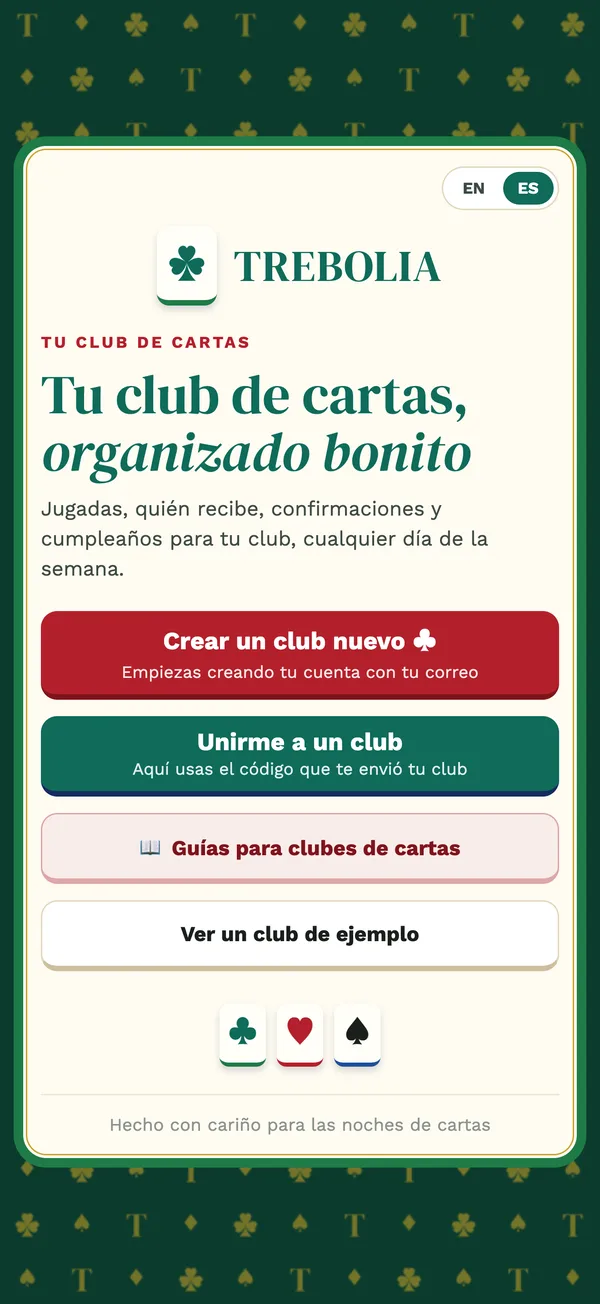
Your language. The app opens in your phone's language; switch between EN and ES at the top of the welcome screen or later in My account. Each person in a club can use a different language.
Create the club: name, game and variant
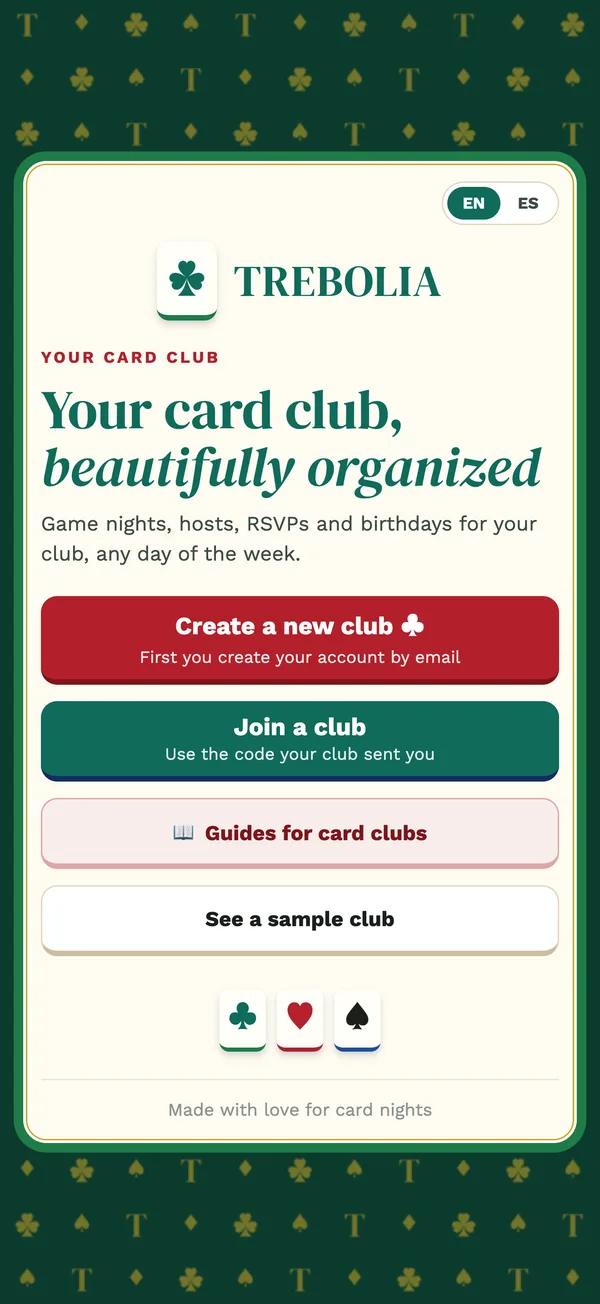
- Tap Create a new club on the welcome screen (or + New club in My clubs).
- Choose the game. Twenty families: canasta (with Hand & Foot), burako, continental, carioca, telefunken, rummy, gin rummy, conquian, chinchón, bridge, spades, hearts, euchre, pinochle, 500, truco, tute, escoba, bunco and rummikub. Each club is one game, with all its variants, and it doesn't change later. Another game is another club.
- Choose the usual variant. Classic canasta, Samba, Hand & Foot, modern American… The variant sets how many people sit at a table (two, four, five or six) and brings its rules; you can change it later in the club's settings.
- Read the rules of the variant. The app shows them with their source so the club agrees on the values before the first hand. Where no single rulebook exists, it says so: check the values with your club.
- Name, day and venue. The club's name (for example "Tuesday Canasta Club"), the usual game day and the venue. Fixed day: the dates of the month appear on their own. Flexible: you add each date.
- Spots per night and the name you'll use in the club. Done: you are the admin and you get the invite code.
Tip. Add the names of your people in Members before they join, one by one or by pasting a list. Then each person just picks their name when they come in.
Invite with the code or the link
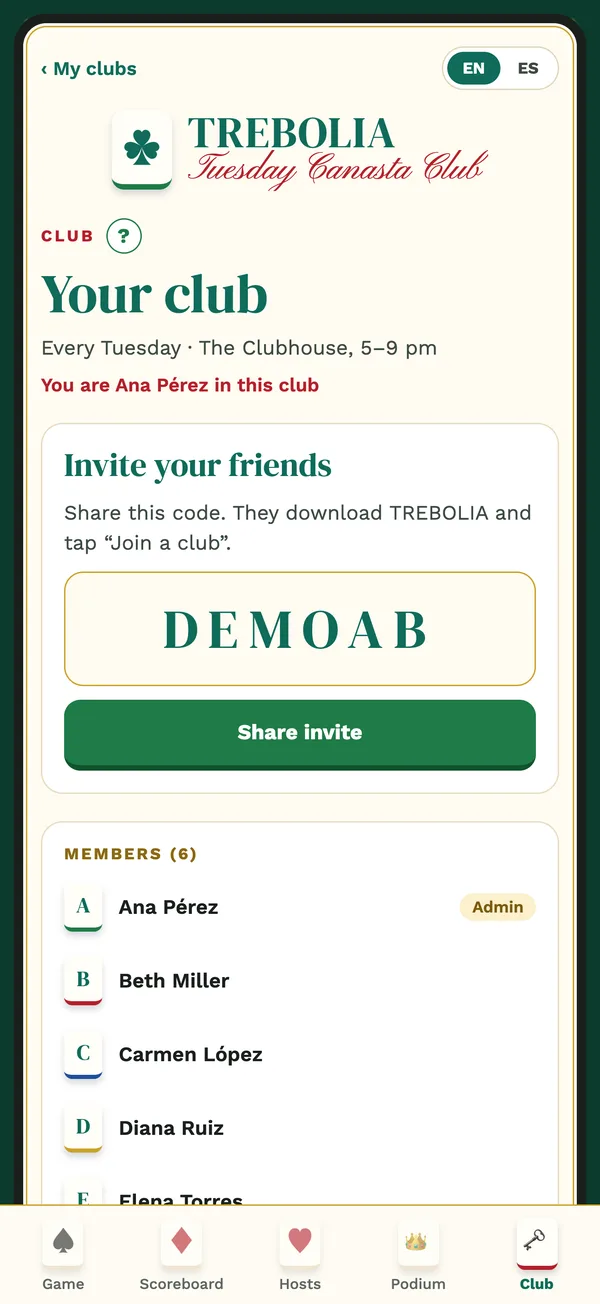
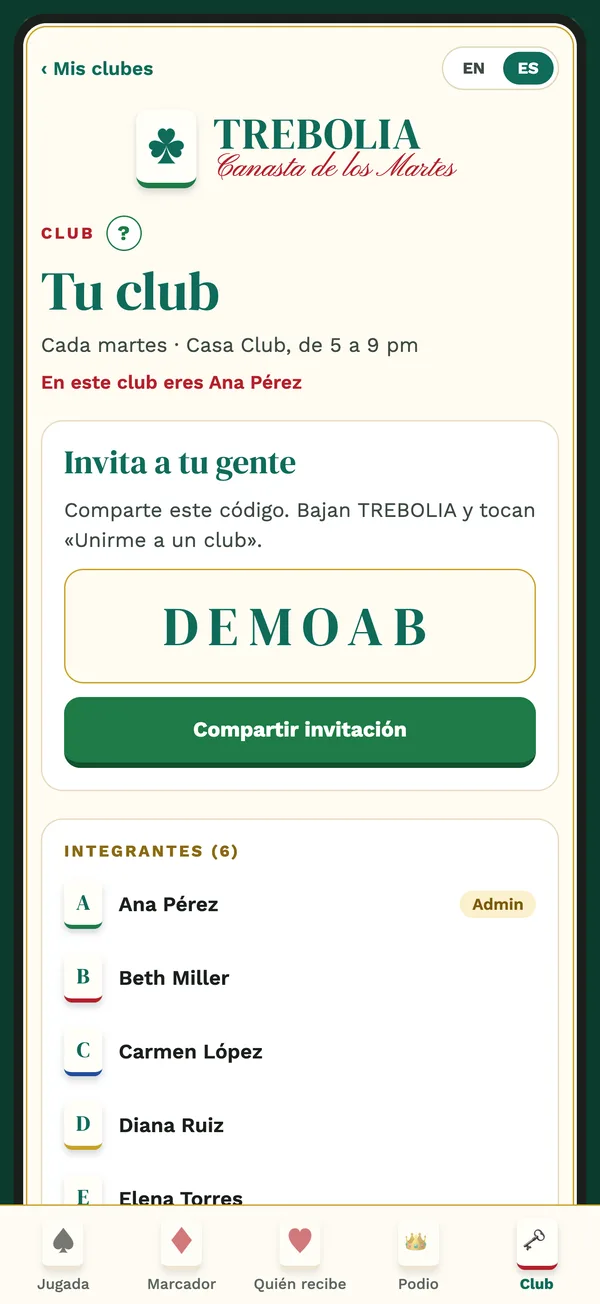
Every club has a 6-character code. It's in the Club tab, with a Share invite button that opens WhatsApp, Messages or whatever you use, with the message already written.
The link trebolia.com/club/CODE goes in that message. Whoever already has TREBOLIA taps it and lands in Join a club with the code filled in. Whoever doesn't lands on a page with the code and the two stores.
The code by itself also works: open the app, Join a club, type the code, pick your name from the list.
Clubs are private. Nobody joins without the code. Don't post it in public places; if it ever leaks, write to us and we'll change it.
Game nights: RSVP, waitlist and subs
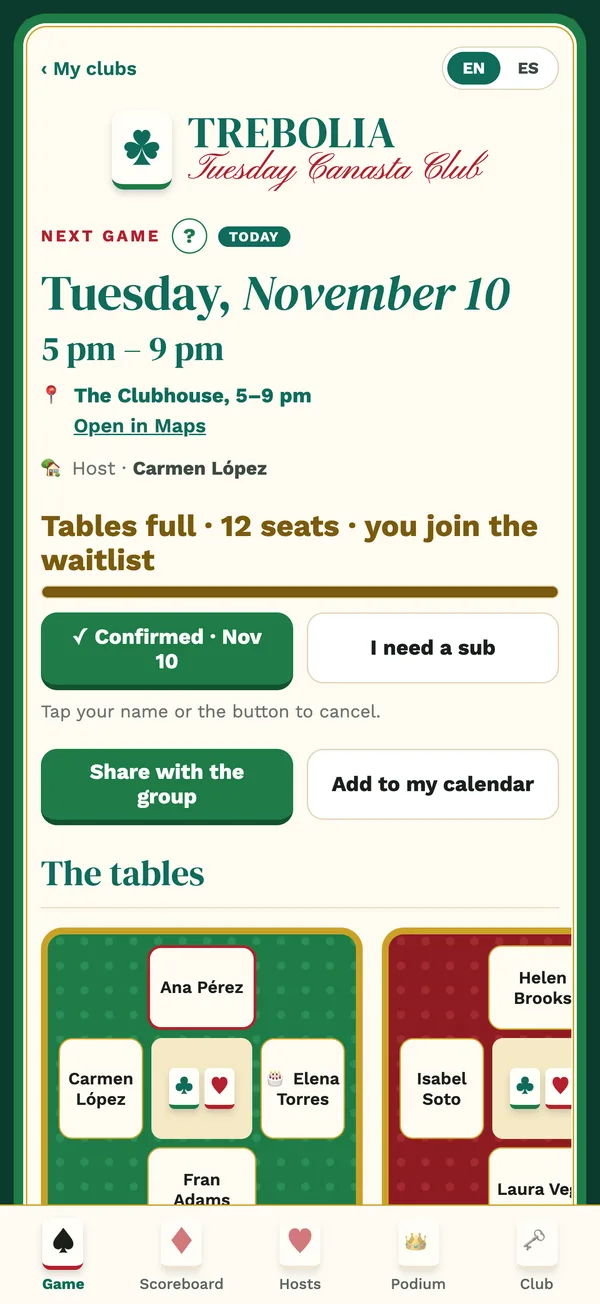
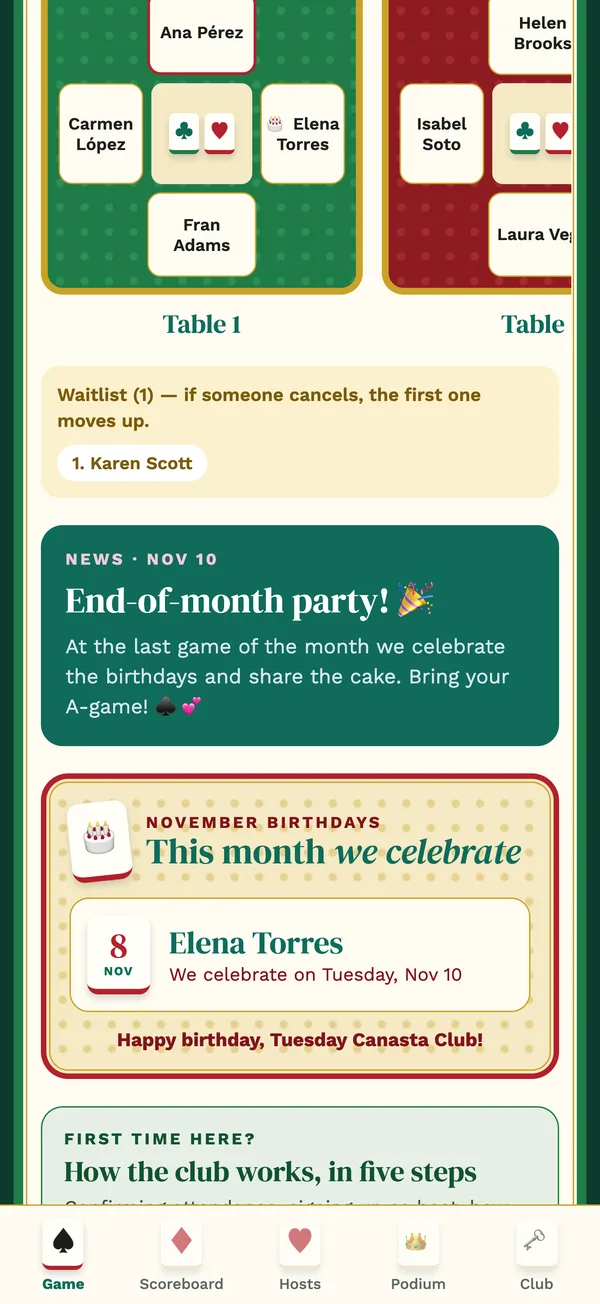
The Game tab shows the next game night: date, time, venue with a map link and who's hosting.
I'm going! Tap it to save your seat. The app counts the seats per table; when they're full, the next people go on the waitlist and move up on their own when someone cancels, with a notice.
I can't this time. Say so with one tap, so the club doesn't wait for you.
I need a sub. If you confirmed and something came up, ask for a sub: the first person on the waitlist takes your seat and both of you get a notice.
Share with the group sends a summary of the night to your chat, and Add to my calendar puts it in your phone's calendar.
Game-day settings (admin): spots, venue and the contribution of that night, the night before or that same day. Lowering the spots moves the last to confirm to the waitlist. A nudge reminds whoever hasn't answered.
Who's hosting
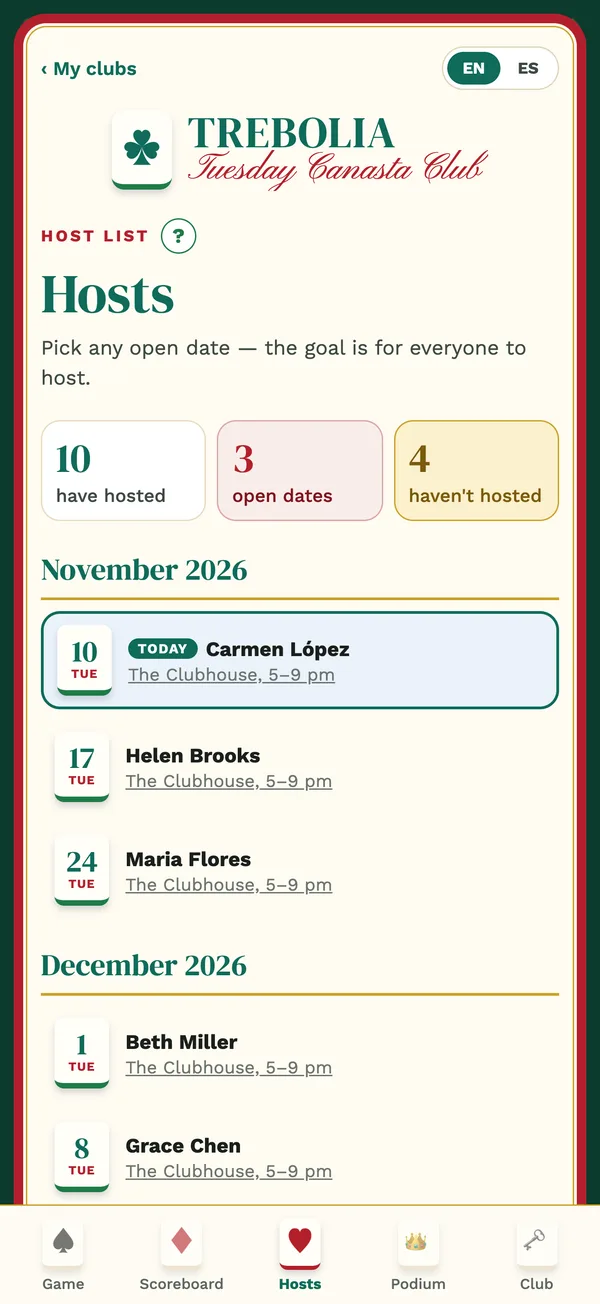
Every game night needs someone to host. In the Hosts tab the dates of the coming months are listed with who has taken each one.
Pick a date. Tap Sign me up on a free date. The venue defaults to the club's; change it if you host at home, and the map link updates for everyone.
Can't anymore? Release the date so someone else can take it.
The goal is that everyone hosts once. The counters at the top show who has hosted, the open dates and who hasn't hosted yet. When nobody takes a date, the admin names someone.
The tables
The tables are drawn the way the game is played: two, four, five or six per table, in pairs when the game is played in pairs. The game of the club decides the shape; the variant, how many sit.
Suggested seating. The app suggests the tables from who confirmed; the admin moves people around before confirming.
Preferences. Each person can say where they'd rather sit; the admin sees it when arranging.
Confirming a table notifies only the people seated at it.
Contributions, gift fund and prize of the month
Many clubs collect a little from everyone to pay for the venue, the snacks, the small gifts along the month and the prize at the end. TREBOLIA keeps those records; the money itself moves between people outside the app, in cash or by transfer, and the app never shows a currency conversion or charges anything.
Monthly contribution. What each person puts into the gift fund every month. The admin sets it in Contributions and records each payment with Record payment, always the oldest month first.
Game-day contribution. A fee for the night, switched on per game night, with the list of who has paid it. Guests pay their night too.
Extras. Contributions apart from the fund, with a name, an amount and a deadline (a costume for the party, a joint gift). They don't go into the fund.
Lessons. Someone new can take a lesson at their first night; the price is set in Contributions.
Prize of the month. The club chooses it and the admin writes it, with a photo if they like, in the club's settings. The gift fund shows how much has come in.
Each person's statement. Tap your name in the scoreboard to see your card: what you've paid, what's pending, the nights you hosted.
Monthly PDF report for the admin: contributions, attendance and the activity log of the month, ready to share with the club.
Score sheets and the monthly scoreboard Coming soon
This part is on its way to TREBOLIA and the app shows it as Coming soon for now. What it will do, so the club can plan for it:
Score sheet of the variant. Record each hand at the table (the admin or the sub-admin of that table) and the app adds it up the way that variant counts.
Monthly scoreboard. Everyone's points for the month, with crowns for whoever leads. Ties share the crown.
Podium and history. Each month's champions, kept for good, and every recorded game night by night.
Until then, keep the score the way your club does today. Everything else in this guide already works.
Everything else the club has
Birthdays. Day and month only. The ones to celebrate show up on the next game night.
News. The admin posts a notice and everyone sees it in their language.
Guests. A one-night pass for someone visiting; members always come first for seats. If they liked the club, the admin makes them a member.
Pauses. Someone travelling can be paused: they stay in the club, without confirmations or contributions, until they're back.
Sub-admins. Helpers on game night, named by the admin. Money and settings stay with the admin.
Poll. A quick question for the whole club.
Activity log. Who changed what, and when.
Styles and text size. 8 club styles, chosen by the admin for the whole club, and large text for whoever wants it.
Help "?". Every section has a "?" at the top that explains it right there.
Without signal. What you record offline is sent when you're back online.
Your account
Several clubs, one account. My clubs lists every club you belong to; tap one to enter.
My account. Your name, language and text size, and Delete my account. Step by step at trebolia.com/delete-account.
Leaving a club frees your hosting dates and takes you out of coming game nights; you can come back with the code.
Help. Support and contact@trebolia.com, usually within one business day.
Organize a club, or several, that sustain themselves
A card club is a small community that meets every week. It needs a place, something to eat and drink, a prize that makes the month worth it and someone who keeps the records. Many clubs cover all of that with the contributions of the people who play, and whoever organizes it does the work for the club, sometimes as their job. TREBOLIA keeps the accounts; here is how clubs usually set them up.
Three sources, one club
The game-day contribution covers the night itself: the venue, the table, coffee and snacks. Whoever hosts at home may receive it; a club that meets at a venue uses it to pay for it.
The monthly fund is what everyone puts in each month. From it come the small gifts along the month that make the nights fun, and the prize of the month.
Extras and lessons. A lesson for whoever is new, a costume party, a joint gift: contributions apart from the fund, with their own deadline.
What TREBOLIA does for the organizer
Who has paid and who hasn't, month by month, with a notice to each person for every payment recorded. No receipts in the chat, no notebook.
The gift fund shows the club how much has come in, so the prize is never a surprise.
The monthly PDF report gives the club the accounts: contributions, attendance and what changed. Transparency is what keeps a club together for years.
The club's rules, the variant and the day are written down in the app, so the same club runs the same way whoever is hosting.
Several clubs
Each club in TREBOLIA is one game and one group of people, with its own code, calendar, tables and accounts. The same account can create and run as many as you can host: canasta on Tuesdays, continental on Thursdays, burako on Saturday afternoons. People who play in two of them join both with each code; you see all your clubs in My clubs.
How organizers usually start. Choose a game and a variant your friends already know, fix the day and the venue, set a game-day contribution that covers the night and a monthly fund that pays a prize worth winning, and run it for a month with TREBOLIA keeping the records. Once the first club runs itself, open the second one for the people who asked for another day or another game.
TREBOLIA records contributions; it doesn't move money, it doesn't set what a club charges and it doesn't promise any income. What each club collects and how it uses it is decided by the club and the person who organizes it, following the laws of where they live.
Cómo usar TREBOLIA
Todo lo que un club necesita, en el orden en que lo vas a necesitar: crear el club, elegir el juego, invitar a tu gente, llevar las jugadas, tener las aportaciones en orden. Al final, cómo se sostiene un club, o varios.
Antes de empezar
Baja el app de la App Store o de Google Play. Por ahora es para teléfono; en una tableta funciona, pero las pantallas están hechas para el teléfono.
Entra con tu correo: el app te manda un código de un solo uso, sin contraseña que recordar. O usa Continuar con Apple o Continuar con Google.
Tu idioma. El app abre en el idioma de tu teléfono; cambia entre EN y ES arriba de la pantalla de bienvenida o después en Mi cuenta. Cada integrante de un club puede usar un idioma distinto.
Crear el club: nombre, juego y variante
- Toca Crear un club nuevo en la pantalla de bienvenida (o + Nuevo club en Mis clubes).
- Elige el juego. Veinte familias: canasta (con Hand & Foot), burako, continental, carioca, telefunken, rummy, gin rummy, conquián, chinchón, bridge, spades, hearts, euchre, pinochle, 500, truco, tute, escoba, bunco y rummikub. Cada club es de un solo juego, con todas sus variantes, y no se cambia después. Otro juego es otro club.
- Elige la variante habitual. Canasta clásica, Samba, Hand & Foot, americana moderna… La variante define cuántas personas se sientan en una mesa (dos, cuatro, cinco o seis) y trae sus reglas; se puede cambiar después en los ajustes del club.
- Lee las reglas de la variante. El app las muestra con su fuente para que el club acuerde los valores antes de la primera mano. Donde no hay un reglamento único, lo dice: revisen los valores con su club.
- Nombre, día y sede. El nombre del club (por ejemplo «Canasta de los Martes»), el día de juego habitual y la sede. Con día fijo, las fechas del mes aparecen solas. Con día flexible, tú agregas cada fecha.
- Cupo por noche y el nombre que usarás en el club. Listo: quedas como admin y recibes el código de invitación.
Consejo. Agrega los nombres de tu gente en Integrantes antes de que entren, uno por uno o pegando una lista. Así cada persona solo elige su nombre al entrar.
Invitar con el código o con el enlace
Cada club tiene un código de 6 caracteres. Está en la pestaña Club, con un botón Compartir invitación que abre WhatsApp, Mensajes o lo que uses, con el mensaje ya escrito.
El enlace trebolia.com/club/CÓDIGO va en ese mensaje. Quien ya tiene TREBOLIA lo toca y cae en Unirme a un club con el código puesto. Quien no, cae en una página con el código y las dos tiendas.
El código solo también sirve: abrir el app, Unirme a un club, escribir el código, elegir tu nombre de la lista.
Los clubes son privados. Sin código nadie entra. No lo publiques en lugares públicos; si algún día se filtra, escríbenos y lo cambiamos.
Las jugadas: confirmación, lista de espera y suplentes
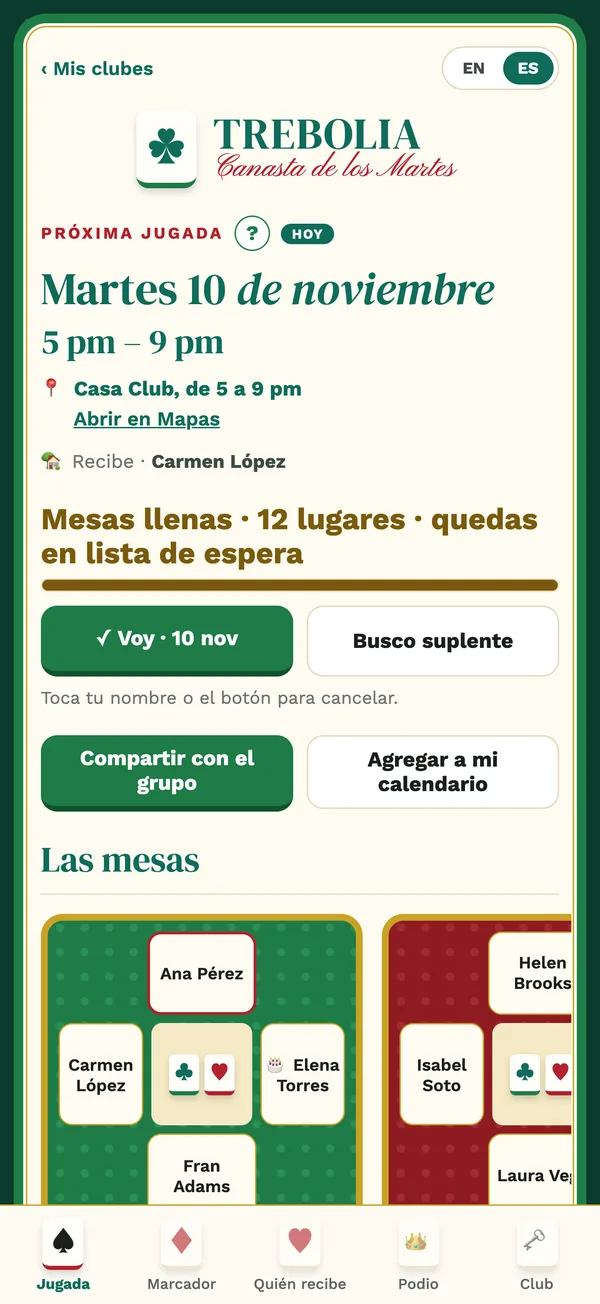
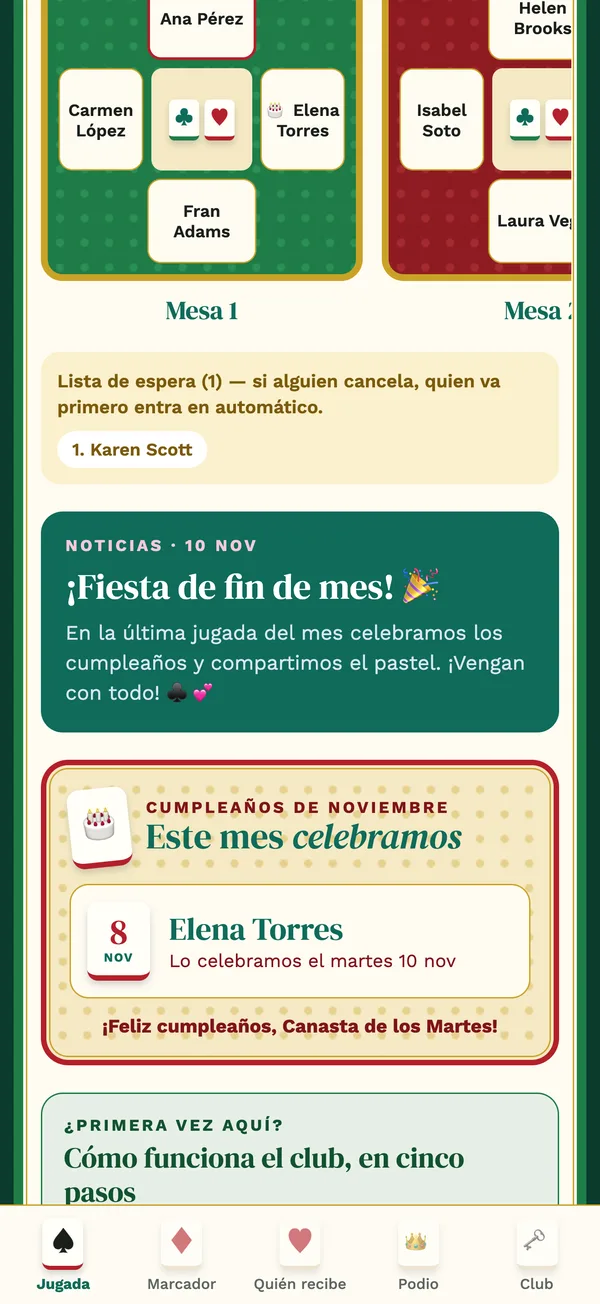
La pestaña Jugada muestra la próxima jugada: fecha, hora, sede con liga al mapa y quién recibe.
¡Voy! Tócalo para apartar tu lugar. El app cuenta los lugares por mesa; cuando se llenan, quienes siguen quedan en lista de espera y suben en automático cuando alguien cancela, con un aviso.
No puedo esta vez. Dilo con un toque, para que el club no te espere.
Busco suplente. Si confirmaste y se te atravesó algo, pide suplente: quien va primero en la lista de espera toma tu lugar y las dos personas reciben un aviso.
Compartir con el grupo manda un resumen de la noche a tu chat, y Agregar a mi calendario la mete en el calendario de tu teléfono.
Ajustes de la noche (admin): cupo, lugar y cuota de esa noche, la víspera o ese mismo día. Bajar el cupo pasa a lista de espera a quienes confirmaron al final. Un empujón recuerda a quien no ha contestado.
Quién recibe
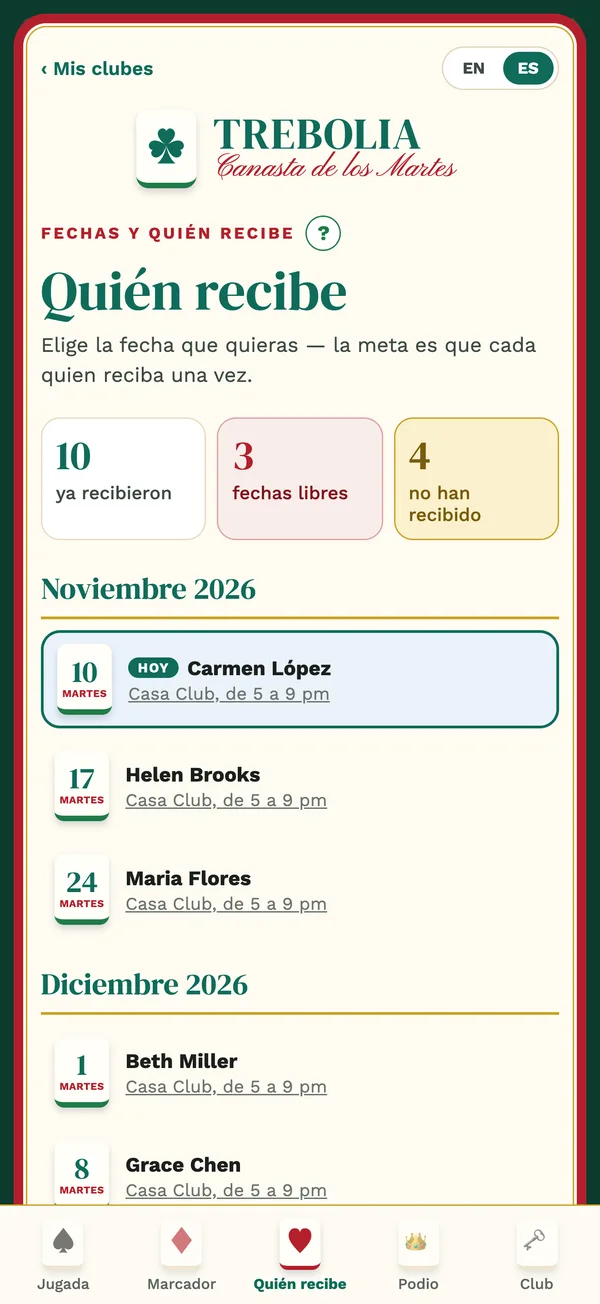
Cada jugada necesita quien reciba esa noche. En la pestaña Quién recibe están las fechas de los próximos meses con quién tomó cada una.
Toma una fecha. Toca Apuntarme en una fecha libre. La sede es la del club; cámbiala si recibes en tu casa, y la liga al mapa se actualiza para todo el mundo.
¿Ya no puedes? Suelta la fecha para que alguien más la tome.
La meta es que cada quien reciba una vez. Los contadores de arriba muestran quiénes ya recibieron, las fechas libres y quiénes faltan. Cuando nadie toma una fecha, quien administra asigna a alguien.
Las mesas
Las mesas se dibujan como se juega el juego: de dos, cuatro, cinco o seis, en parejas cuando el juego es en parejas. El juego del club decide la forma; la variante, cuántas personas se sientan.
Acomodo sugerido. El app propone las mesas a partir de quién confirmó; quien administra mueve a la gente antes de confirmar.
Preferencias. Cada quien puede decir dónde prefiere sentarse; quien administra lo ve al armar.
Confirmar una mesa avisa únicamente a quienes están en ella.
Aportaciones, fondo para regalos y premio del mes
Muchos clubes juntan un poco de cada quien para pagar la sede, la botana, los regalitos a lo largo del mes y el premio de fin de mes. TREBOLIA lleva ese registro; el dinero se mueve entre las personas fuera del app, en efectivo o por transferencia, y el app nunca convierte monedas ni cobra nada.
Cuota mensual. Lo que cada integrante aporta cada mes al fondo para regalos. Quien administra la fija en Cuotas y registra cada pago con Registrar pago, siempre el mes más atrasado primero.
Cuota del día de juego. Una cuota por la noche, que se activa jugada por jugada, con la lista de quién ya la pagó. Las visitas también pagan su noche.
Extras. Aportaciones aparte del fondo, con nombre, monto y fecha límite (un disfraz para la fiesta, un regalo entre todo el club). No entran al fondo.
Clases. Quien entra nuevo puede llevar clase en su primera noche; el precio se fija en Cuotas.
Premio del mes. El club lo elige y quien administra lo escribe, con foto si quiere, en los ajustes del club. El fondo para regalos muestra cuánto se ha juntado.
El estado de cuenta de cada quien. Toca tu nombre en el marcador para ver tu tarjeta: lo que has pagado, lo pendiente, las noches en que recibiste.
Reporte mensual en PDF para quien administra: aportaciones, asistencia y la bitácora del mes, listo para compartir con el club.
Hojas de puntos y marcador del mes Próximamente
Esta parte viene en camino a TREBOLIA y por ahora el app la muestra como Próximamente. Lo que va a hacer, para que el club cuente con ello:
Hoja de puntos de la variante. Anotar cada mano en la mesa (quien administra o quien subadministra esa mesa) y el app la suma como cuenta esa variante.
Marcador del mes. Los puntos de cada quien en el mes, con coronas para quien va ganando. En empate, corona para cada quien.
Podio e historial. Quien ganó cada mes, para siempre, y cada partida anotada noche por noche.
Mientras tanto, lleven los puntos como lo hace hoy su club. Todo lo demás de esta guía ya funciona.
Todo lo demás que tiene el club
Cumpleaños. Solo día y mes. Los que toca celebrar aparecen en la próxima jugada.
Noticias. Quien administra publica un aviso y todo el mundo lo ve en su idioma.
Visitas. Un pase de una noche para quien viene de visita; quienes integran el club van primero en los lugares. Si le gustó el club, quien administra le da lugar como integrante.
Pausas. Quien anda de viaje se pone en pausa: sigue en el club, sin confirmaciones ni aportaciones, hasta que vuelve.
Subadmins. Ayudan la noche de la jugada; los nombra quien administra. El dinero y los ajustes se quedan con quien administra.
Encuesta. Una pregunta rápida para todo el club.
Bitácora. Quién cambió qué y cuándo.
Estilos y tamaño de letra. 8 estilos de club, que elige quien administra para todo el club, y letra grande para quien la quiera.
El «?» de ayuda. Cada sección tiene un «?» arriba que la explica ahí mismo.
Sin señal. Lo que anotes sin conexión se envía al volver la señal.
Tu cuenta
Varios clubes, una cuenta. Mis clubes lista todos los clubes a los que perteneces; toca uno para entrar.
Mi cuenta. Tu nombre, idioma y tamaño de letra, y Borrar mi cuenta. Paso a paso en trebolia.com/delete-account.
Salir de un club libera tus fechas de recibir y te saca de las jugadas que vienen; puedes volver con el código.
Ayuda. Soporte y contact@trebolia.com, normalmente en un día hábil.
Organiza un club, o varios, que se sostengan solos
Un club de cartas es una comunidad pequeña que se reúne cada semana. Necesita un lugar, algo de comer y beber, un premio que haga valer el mes y alguien que lleve las cuentas. Muchos clubes cubren todo eso con las aportaciones de quienes juegan, y quien lo organiza hace ese trabajo para el club, a veces como su oficio. TREBOLIA lleva las cuentas; así suelen armarlas los clubes.
Tres fuentes, un club
La cuota del día de juego cubre la noche misma: la sede, la mesa, el café y la botana. Quien recibe en su casa puede recibirla; un club que se reúne en un local la usa para pagarlo.
El fondo mensual es lo que cada quien aporta cada mes. De ahí salen los regalitos a lo largo del mes que hacen divertidas las jugadas y el premio de fin de mes.
Extras y clases. Una clase para quien entra nuevo, una fiesta de disfraces, un regalo entre todo el club: aportaciones aparte del fondo, con su propia fecha límite.
Lo que TREBOLIA hace por quien organiza
Quién ya pagó y quién falta, mes por mes, con un aviso a cada persona por cada pago registrado. Sin comprobantes en el chat ni libreta.
El fondo para regalos le muestra al club cuánto se ha juntado, para que el premio nunca sea una sorpresa.
El reporte mensual en PDF le da al club las cuentas: aportaciones, asistencia y lo que cambió. La transparencia es lo que mantiene un club unido por años.
Las reglas del club, la variante y el día quedan escritos en el app, para que el mismo club funcione igual reciba quien reciba.
Varios clubes
Cada club en TREBOLIA es un juego y un grupo de personas, con su propio código, calendario, mesas y cuentas. La misma cuenta puede crear y llevar tantos como puedas recibir: canasta los martes, continental los jueves, burako los sábados por la tarde. Quien juega en dos entra a los dos con cada código; tú ves todos tus clubes en Mis clubes.
Así suelen empezar quienes organizan. Elige un juego y una variante que tu gente ya conozca, fija el día y la sede, pon una cuota del día de juego que cubra la noche y un fondo mensual que pague un premio que valga la pena, y llévalo un mes con TREBOLIA registrando todo. Cuando el primer club camine solo, abre el segundo para la gente que pidió otro día u otro juego.
TREBOLIA registra aportaciones; no mueve dinero, no fija lo que un club cobra y no promete ningún ingreso. Lo que cada club junta y cómo lo usa lo deciden el club y la persona que lo organiza, conforme a las leyes del lugar donde viven.